From Card Readers to Face ID: Reinventing Secure Banking
Reducing login friction and simplifying everyday banking through biometric authentication and streamlined information architecture.
Project Overview
Client: Nationwide Building Society
Role: Sr. UI/UX Designer
Duration: 2+ Years (Ongoing)
Tools: Figma, Miro
Team Setup: Collaborated with on-shore design team; worked individually and as part of cross-functional teams across value streams.
Design Brief
Nationwide's mobile banking app, used by millions of UK customers, was experiencing friction due to outdated authentication methods and scattered navigation patterns. Users had to rely on hardware card readers for critical tasks like transfers, leading to delays and dissatisfaction. As the bank moved towards modernizing its digital infrastructure, our task was to redesign the mobile banking experience to be seamless, secure, and efficient, empowering customers with intuitive interactions and smarter workflows.

Problem
Customers were frustrated by an outdated login process, especially when quick access was needed for tasks like checking balances or transferring funds. The lack of biometric authentication and a fragmented information hierarchy made everyday banking cumbersome. While the legacy UI adhered to baseline accessibility standards, it still posed usability challenges for older customers and those with visual impairments particularly around contrast, type sizing, and content discoverability.
Hypothesis
We hypothesized that redesigning the mobile app with a streamlined IA, integrated biometric authentication, and a component-driven design system would:
-
Reduce user drop-offs during login and transaction flows by 30–40%
-
Improve time-to-task completion for core actions like "view balance" or "make a payment"
-
Enhance user trust through consistency, accessibility, and modern UI patterns
Research Approach
Since UX research was led by the onshore team, I collaborated closely with them to extract actionable insights. This included:
-
Supported the onshore research team by translating key research findings into actionable UI design decisions, particularly around login friction, content discoverability, and mobile-first interactions
-
Studying competitor apps for patterns in biometrics, cardless transactions, and dashboards

Competitor Analysis
We reviewed mobile banking apps from top UK and global financial institutions, focusing on authentication flows, navigation models, and product discoverability.
Key takeaways included:
-
Most modern apps prominently featured Face ID or fingerprint login with fallback options.
-
Competitors like Monzo and Revolut offered simplified dashboards with upfront access to balances and transactions.
-
Quick-access shortcuts (like recent payees or 'Send again') were standard in most payment flows.
-
Financial products were grouped under a single hub, avoiding deep navigation trees.


Key Insights
-
Biometric demand was high. Users wanted Face ID or fingerprint login to avoid using card readers.
-
Account information was scattered. Users had difficulty accessing summary views or toggling between accounts.
-
Navigation was unintuitive. Important features like savings goals or passcode updates were buried under layers.
Goals
-
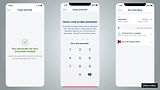
Reduce login friction by integrating Face ID and fingerprint authentication, allowing users to skip card reader steps and access the app more efficiently.
-
Improve discoverability by restructuring product and account navigation, making it easier to find key financial tools and insights.
-
Create a component-driven design using scalable UI elements for consistency across features and smoother developer collaboration.
Design Process
Component-Driven UI System
-
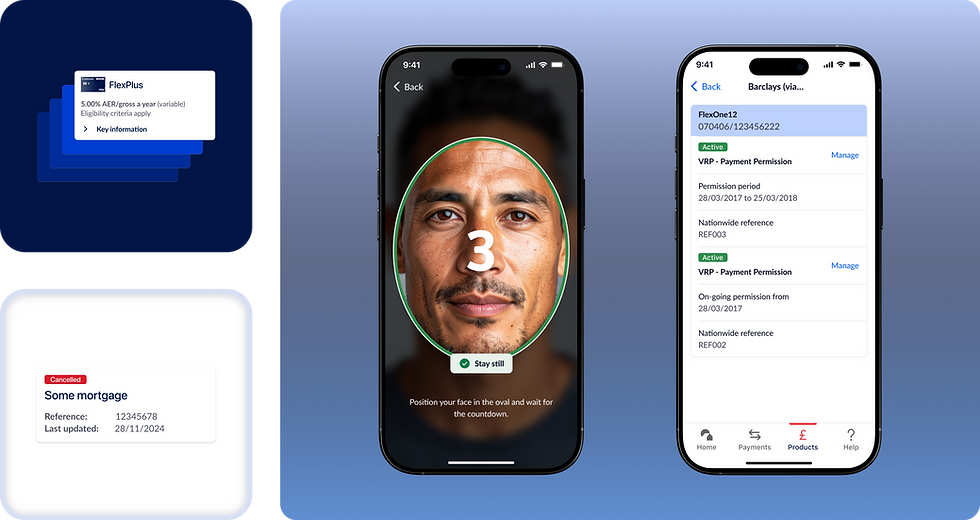
Designed reusable components (cards, toggles, summary views, modals)
-
Proposed inclusion into the design system to ensure scalability across teamsMobile-First Patterns
-
Focused on thumb-reach zones and tap target sizes
-
Applied progressive disclosure in features like mortgage applications

Components


User Persona

James Connor
Age: 34
Occupation: Digital Marketing Manager
Location: Manchester, UK
Goals: Access accounts quickly with Face ID; consolidate account tracking
Pain Points: Frustrated by old passcode logins; navigation feels slow
Traits: Daily app user, prefers minimal-step flows and personalization

Mary Thompson
Age: 55
Occupation: Teacher
Location: Leeds, UK
Goals: View pension and savings easily; complete tasks without help
Pain Points: Struggles with multi-step flows and small UI text
Traits: Uses tablet, values clarity and accessibility
User Journey

Micro-Interaction
To enhance user feedback and system clarity, I created micro-interactions for key touchpoints like biometric login, error states, and payment confirmations.
These subtle animations helped:
-
Reinforce success and error cues
-
Guide user attention through state changes
-
Improve perceived responsiveness of the interface

Final Solution


Feature Enhancements: Show/Hide and Reorder Accounts
Introduced customization options allowing users to hide selected accounts from the dashboard and reorder accounts by priority. These features improved personalization, reduced clutter, and increased user satisfaction. The design leveraged new and existing components with accessibility considerations, informed by user research and ongoing collaboration with the project manager and UX researcher.
Feature Spotlight: Digital Cheque Deposit (POC)
Goal: Enable users to deposit cheques digitally via the mobile app
UI/UX Considerations:
-
Simple step-by-step capture process
-
Clear confirmation and receipt post-deposit
-
Help icons and microcopy to guide users unfamiliar with digital cheque deposits
-
Mobile camera permissions and image quality indicators for clarity
Stakeholder Feedback:
-
The feature was well received internally and appreciated for its potential to reduce reliance on branch visits and manual processing.
[Placeholder for visuals: Wireframes and final screens of cheque deposit flow]




